
Stop Adding Inventory by Hand. Search and Add from Distributors in Seconds.
Supplier Connections gives your team one place to search distributors and build inventory records, and another to check live pricing and availability when ordering. Cut out manual entry. No switching between systems.
Two Functions. One Workflow.
Supplier Connections does two distinct things, and both cut out work your team shouldn’t be doing manually.
Function 1: Adding Inventory
Vendor Inventory Search
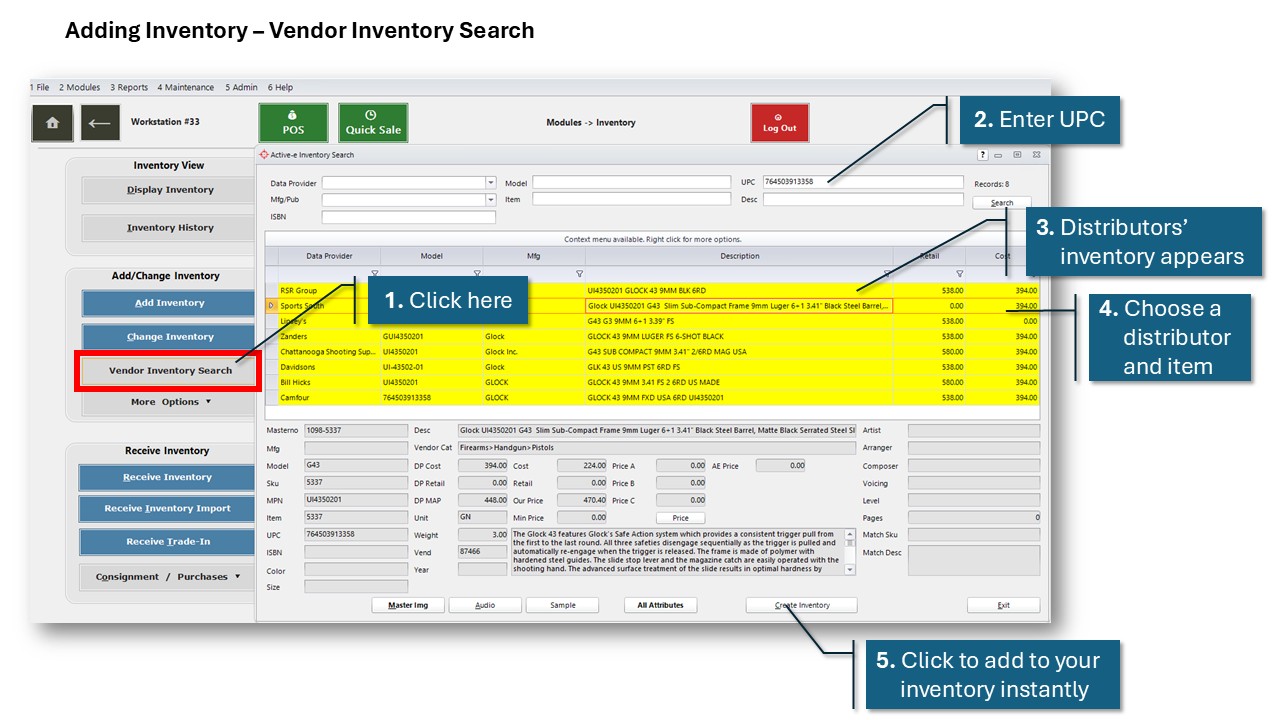
Enter a UPC and AIM searches every connected distributor at once. You see product details, pricing, and cost side by side across Sports South, RSR Group, Lipsey’s, Davidson’s, and others on one screen. Select the description you want, click Create Inventory, and AIM can pre-populate manufacturer, model, caliber, category, subcategory, vendor, cost, and retail price automatically. No copy-pasting. No blank fields.
Best For: Adding new products to your inventory for the first time.
Available Distributors: 5.11 Tactical, Bill Hicks, Camfour, Chattanooga Shooting Supplies, Davidson’s, Gun Accessory Supply (GAS), Lipsey’s, RSR Group, Sports South, Zanders
Function 2: Ordering and Receiving
Vendor Lookup by UPC
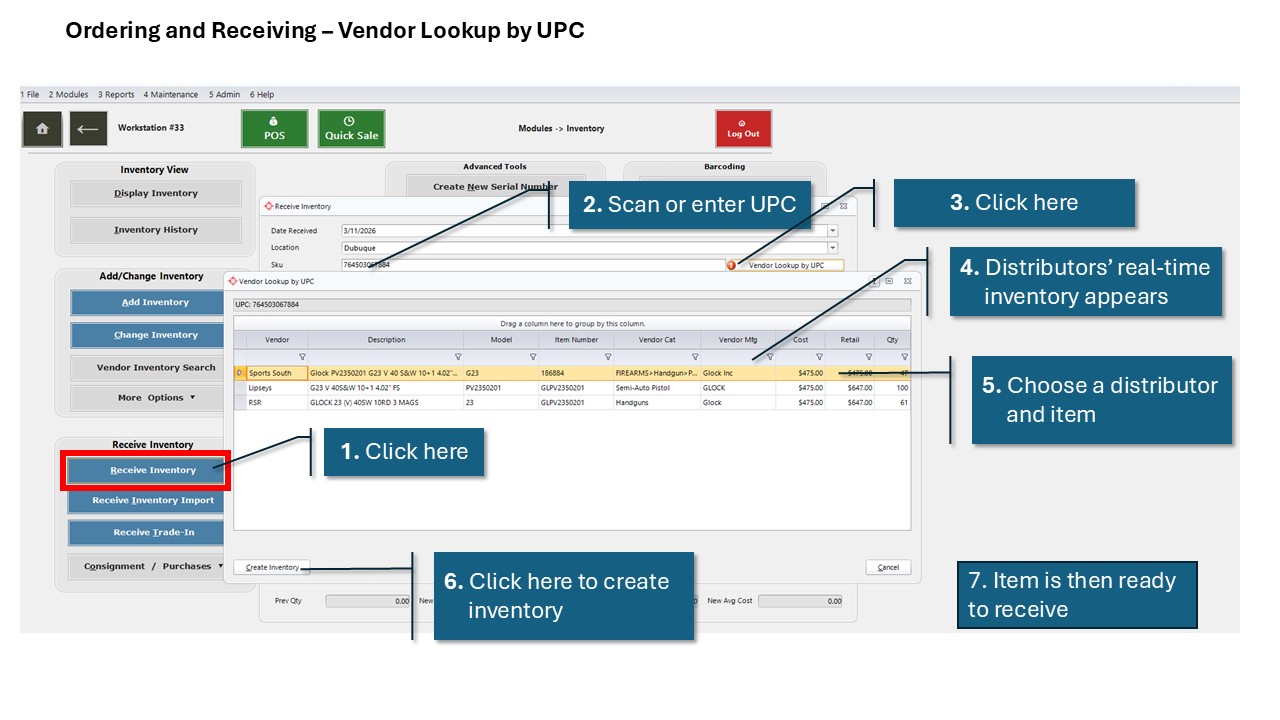
When a customer asks about a special order or a shipment arrives at your back door, scan or enter the UPC from the Enter Committed Orders or the Receive Inventory screen. AIM makes a real-time call to Sports South, RSR Group, and Lipsey’s and returns live price, cost, and quantity. If the item isn’t in your system yet, you can create it and receive it in the same workflow. No switching screens. No duplicate entry.
Best for: Special orders and receiving purchase orders.
Available Distributors: Lipsey’s, RSR Group, Sports South
Vendor Inventory Search:
Modules > Active-e > Inventory Search
Vendor Lookup by UPC:
Modules > Purchase Orders > Enter Uncommitted or Committed Orders
Modules > Inventory > Receive Inventory or Display Inventory
Your Team Knows How Long This Used to Take
Before Supplier Connections, adding a new item meant opening a blank record in “Add Inventory” and filling in every field manually: serialization type, category, subcategory, manufacturer, model, vendor, cost, retail. One by one. And then receiving it. Checking distributor availability for a special order meant jumping between websites. Or downloading massive catalogs into your AIM system.
Now scan a UPC, pick a description, and hit Create. Every field populates automatically once mapped. At the counter, live pricing and availability from connected distributors comes back in seconds.
Pricing
$55 per month, added directly to your existing AIM contract. No setup fees. No per-transaction or per-supplier charges. Enabled at the account level, so your team can start using it immediately.